
Web Propulsion Email Hosting Spam Protection
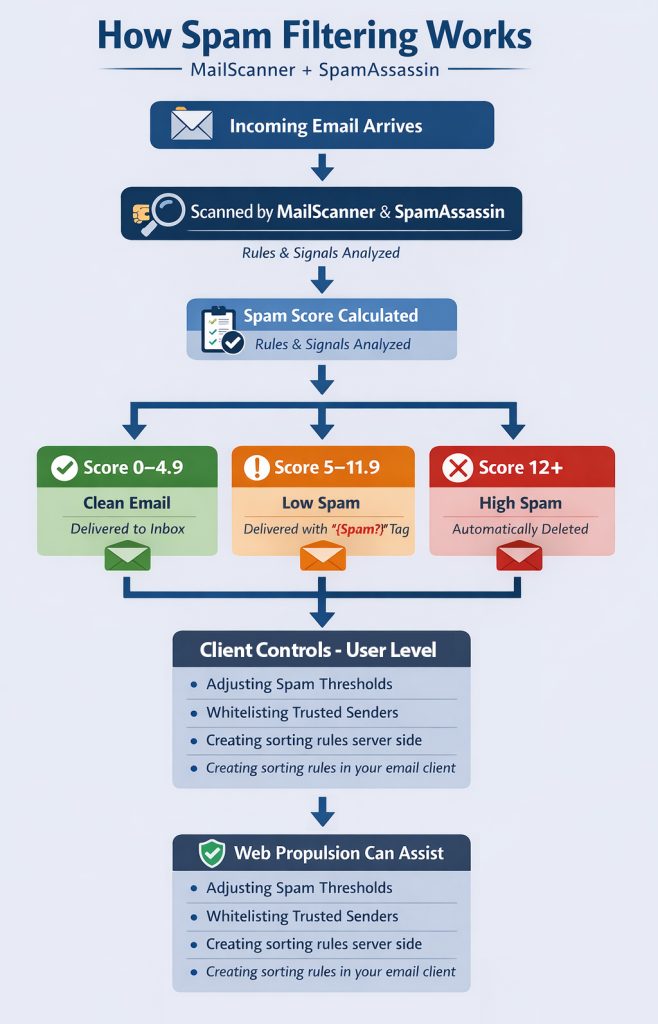
All incoming email on our servers is scanned using MailScanner and SpamAssassin, which assign each message a spam score based on factors like content, formatting, and sender reputation.
Based on that score, emails are handled as follows:
- Score 0 – 4.9 → Delivered normally to your inbox
- Score 5 – 11.9 → Delivered, but marked as possible spam (you may see something like
{Spam?}in the subject line) - Score 12+ → Considered obvious spam and automatically deleted
This approach reduces inbox clutter while still allowing you to review questionable emails before they are blocked entirely.
The chart below is a visual representation of this process:
What This Means in Practice
Spam scoring is cumulative. A single issue (like HTML formatting) won’t usually flag an email, but multiple small issues can add up quickly.
For example, marketing emails or newsletters may sometimes fall into the “Low Scoring Spam” category and be tagged, even though they are legitimate.
You Have Control Over How Spam is Scored
If you’d like to adjust how strict your spam filtering is, you can do so inside your cPanel:
- Log in to cPanel
- Go to MailScanner Front-End
- Navigate to User Spam Settings
- Adjust:
- Low Spam Threshold (default: 4)
- High Spam Threshold (default: 12)
You can make filtering more or less aggressive depending on your preferences.
Whitelisting Trusted Senders
If you notice legitimate emails being flagged:
- Go to MailScanner → Whitelist in cPanel
- Add the sender’s email address or domain (e.g., company.com)
This ensures their messages are always delivered without being filtered.
A Quick Note
- Lower thresholds = more protection, but higher chance of false positives
- Higher thresholds = fewer false positives, but more spam may reach your inbox
We’ve set the current defaults to strike a strong balance between protection and usability.
As always at Web Propulsion Hosting, we are available to answer any questions and assist you with the settings discussed above; we’re happy to help. Thank you for trusting us with your hosting and email services. We appreciate your business.